How to Publish a Translated Book on Amazon KDP
Learn how to publish a translated book on Amazon KDP, from preparing your EPUB and localising your metadata to choosing categories, pricing and checking your finished listing.

Written by Teddy Smith
BookLingua founder, author and host of The Publishing Performance Show
Translating your manuscript is a big part of reaching readers in another country, but it’s not the final step.
You still need to turn that translation into a properly formatted ebook or paperback, create a listing for the new market and make decisions about your description, keywords, categories and price. If you do not speak the target language, those decisions can feel almost as daunting as translating the book itself.
I recently went through this process with the German edition of my gothic romantasy novella, Bride of the Hollow King. The translated edition, Braut des Höhlenkönigs, was published as a Kindle ebook through Amazon KDP and made available on Amazon.de. You can also read the full Bride of the Hollow King translation case study, including examples from the French and German translations and feedback from native-language reviewers.
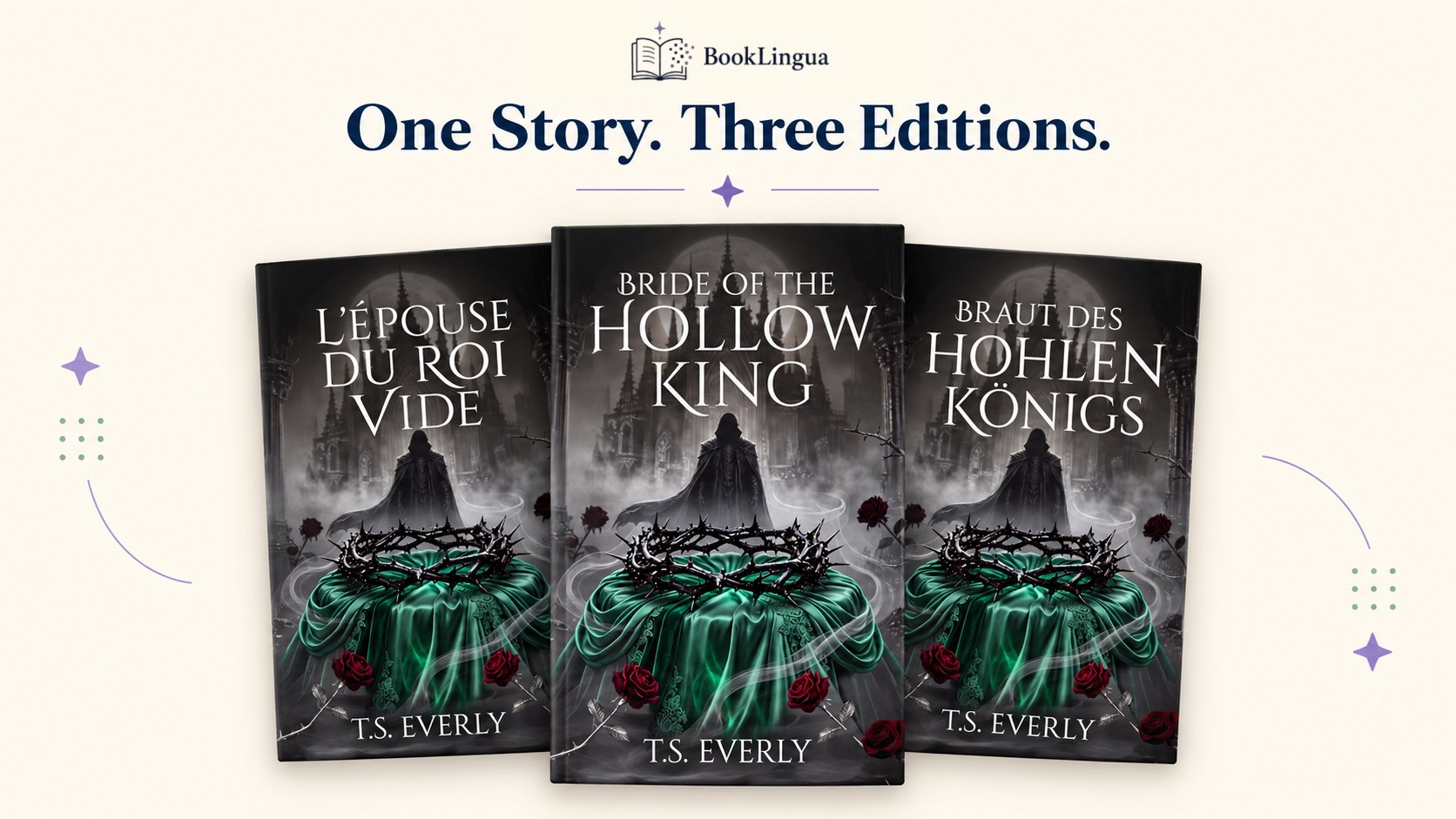
Bride of the Hollow King and its French and German translated editions.
The upload itself was straightforward. I used the EPUB supplied by BookLingua and followed the recommendations in its German Launch Pack for the description, categories and sales price. The positioning and marketing hooks in the pack even helped me to come up with the German front cover! I did spot one small language error during my final checks, which was another useful reminder that you should always preview the finished ebook before pressing publish.
Here is the process I followed, along with the things I would check before publishing any translated book through KDP.
If you are earlier in the process, read our complete guide to translating a book with AI first. It covers manuscript preparation, translation, validation, editorial review and localisation before the KDP upload begins.
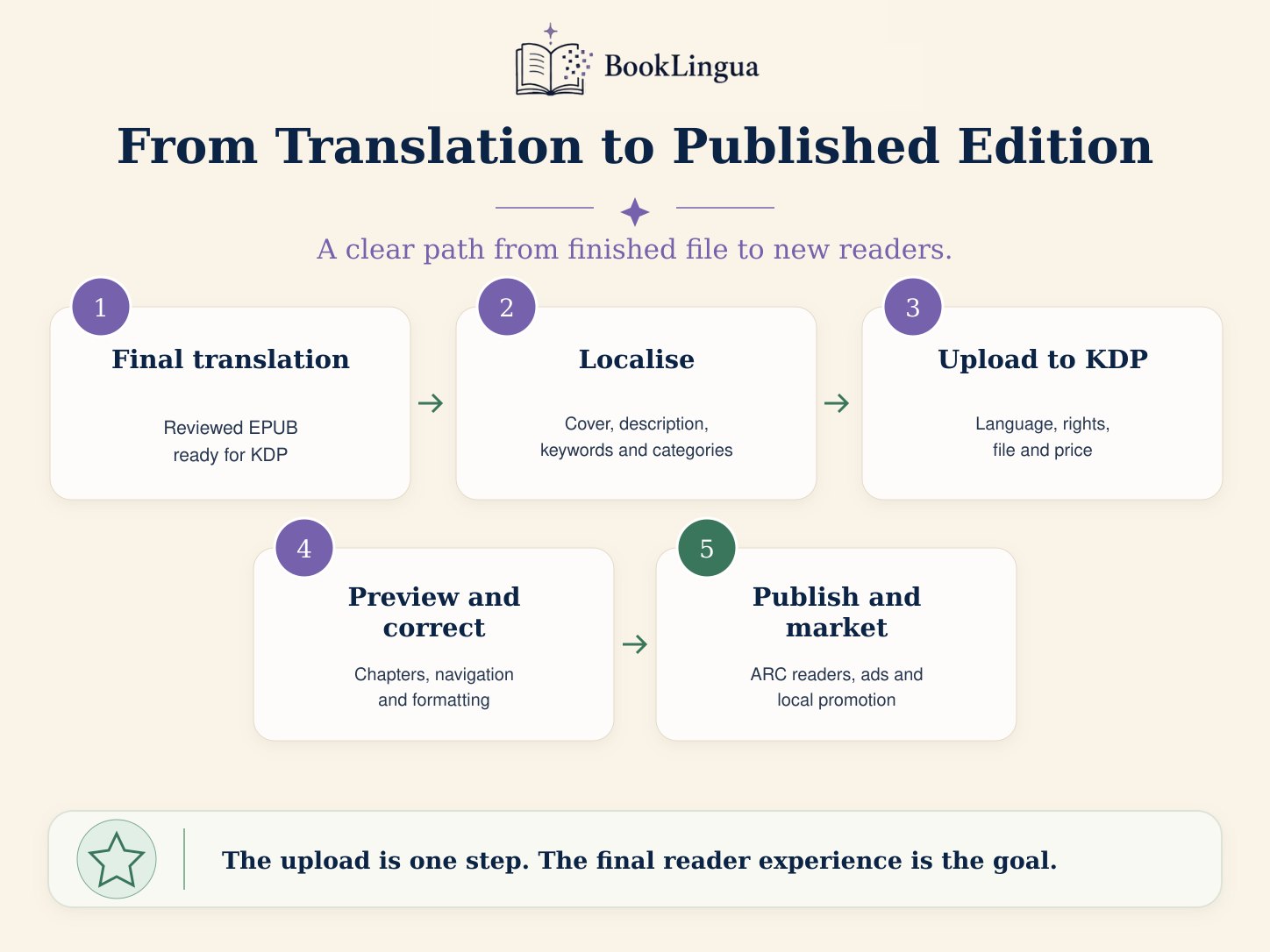
Table of Contents
- 1. Treat the translation as a new edition
- 2. Prepare the correct file for your format
- 3. Create a new Kindle ebook in KDP
- 4. Choose the translated language and enter the metadata
- 5. Localise the description rather than translating it literally
- 6. Choose categories and keywords for the new market
- 7. Upload the translated EPUB and cover
- 8. Always use the KDP previewer
- 9. Set a price for the target market
- 10. Choose your territories and distribution options
- 11. Review the live listing after publication
- 12. Plan how readers will find the translated edition
- What made the process easier for me
- Translating the book is only part of the launch
1. Treat the translation as a new edition
A translated book is not simply the original edition with different text inside it. It has its own language, title, description, keywords, categories, cover and pricing decisions. In practice, that means creating a new title in your KDP Bookshelf rather than replacing the manuscript attached to your existing English edition.
Before you begin, gather everything you need including:
-
Your final translated manuscript
-
The translated book title and subtitle
-
A front cover using the translated title and suitable positioning for the new market
-
A description written for the target market
-
Relevant keywords and categories
-
Your planned list price
-
The translator or contributor details you intend to include
Keep the final files clearly labelled. The clean final EPUB or DOCX is the file you want to publish. Review documents, editorial reports and translation notes are useful during quality control, but they are not the files you upload as the finished book.
Our manuscript-preparation checklist explains how to clean the source file and preserve chapter structure before translation.
2. Prepare the correct file for your format
KDP treats Kindle ebooks and paperbacks as separate formats, and they need different files.
For a Kindle ebook
An EPUB is usually the simplest option. It uses reflowable text, which means readers can change the font, text size and spacing on their Kindle.
I uploaded the final German EPUB supplied by BookLingua. I didn’t need to rebuild the ebook in another formatting program, and KDP accepted the file without any technical problems.
If you upload an EPUB to BookLingua, the translated EPUB is designed to preserve the chapter structure and paragraphs in a clean ebook format. You should still check it carefully, particularly if your original book contains custom fonts, decorative chapter headings, drop caps, images or a complex layout.
For a paperback
A paperback needs a print-ready format, usually a PDF, with a fixed trim size, margins and page layout. You’ll also need a full wraparound cover sized for the final page count, rather than the front-cover image used for a Kindle ebook.
This is where software such as Atticus can be helpful. You can import the translated manuscript, choose the right trim size and export separate files for ebook and print.
3. Create a new Kindle ebook in KDP
From your KDP Bookshelf, choose Create and then Kindle eBook. KDP divides the setup into three main areas:
-
Kindle eBook details
-
Kindle eBook content
-
Kindle eBook pricing
You can save the book as a draft and come back to it, so there’s no need to complete every field in one sitting.
4. Choose the translated language and enter the metadata
Set the book language to the language of the new edition. For Braut des Höhlenkönigs, I selected German.
If you have not chosen your first market yet, compare the main options in Which Language Should You Translate Your Book Into?.
Then enter the translated title and subtitle exactly as they appear on the cover and inside the manuscript. Make sure you check spelling, accents and capitalisation across all three.
You’ll also need to complete fields such as:
-
Author name
-
Series information, if applicable
-
Edition number
-
Contributors
-
Book description
-
Publishing rights
-
Primary audience
-
Marketplace
-
Categories and keywords
Don’t automatically copy every field from the English edition. Your author name and series may stay the same, but the description, keywords and categories should be chosen for readers searching in the target language.
Note: All German books (even self-published ones) need to include German Impressum which is a legal notice usually on the first or last page that identifies the publisher or author responsible for the content of a publication.
5. Localise the description rather than translating it literally
Think of your Amazon description as sales copy. Its job is not just to communicate the same information as the English description; it needs to make the book appealing to readers in its new market.
A literal translation may be grammatically accurate but still feel awkward or overly formal. For the German edition of Bride of the Hollow King, the BookLingua Launch Pack included a German description ready to paste into the Amazon listing. It led with the central hook: a heroine waking in a torn wedding dress, unable to remember her fiancé, while a dangerous fae king claims her at a cursed court.
That was much more useful than facing an empty description box and trying to decide whether the English blurb would work word for word in German.
Read the final description alongside the cover and opening chapters. They should match the book's genre, tone and level of romance.
6. Choose categories and keywords for the new market
Categories do not always translate neatly between Amazon marketplaces. A category that makes sense in the UK or US store may be labelled differently in Germany, France, Spain or Italy.
Search behaviour changes too. Translating an English keyword literally does not guarantee that it is the phrase readers actually use.
The German Launch Pack recommended categories including:
-
Kindle-Shop > eBooks > Liebesromane > Fantasy
-
Kindle-Shop > eBooks > Fantasy > Romantische Fantasy
-
Kindle-Shop > eBooks > Fantasy > Dark Fantasy
It also supplied seven German backend keyword phrases based on the book's genre, themes and tropes which I could use for running Amazon ads. These covered ideas such as dark romantasy, an arranged marriage, a dangerous fae king, a cursed court and a heroine with missing memories.
Amazon's menus can change, so use the closest current match if an exact category path is no longer available. Categories and keywords should accurately reflect the book; do not force it into a popular but misleading category simply because it appears easier to rank there.
7. Upload the translated EPUB and cover
In the Kindle eBook content section, upload your final EPUB and the front-cover file for the translated edition. Make sure the title and author name on the cover match the metadata you have entered. The cover should be designed for the new edition rather than leaving the English title in place. The translated title is only part of that job. The cover also needs to communicate the book's genre and strongest hook to readers in the new market.
For Braut des Höhlenkönigs, the German Launch Pack helped me design the front-cover direction as well as the Amazon listing. Its recommended positioning led with the torn wedding dress, the forgotten groom, the dangerous fae king and the cursed court. Those same ideas could then guide the imagery, atmosphere and emphasis of the German cover.
KDP does not require an ISBN for a Kindle ebook. Amazon assigns the ebook its own identifier when it is published. Print editions are different: paperbacks and hardcovers require their own ISBNs, and each format should be treated separately.
KDP may also ask whether the book contains AI-generated content. Amazon's definition covers AI-generated translations so make sure you select the correct option.
8. Always use the KDP previewer
Once KDP has processed the EPUB, open the previewer and move through the entire book.
Check:
-
The title page
-
Copyright and translation information
-
Table of contents and navigation
-
Chapter titles and chapter order
-
Paragraph spacing and indents
-
Italics and scene breaks
-
Images and decorative elements
-
Front and back matter
-
Links
-
The final page
Don’t just look at the opening chapter. Check the book on different simulated device sizes and select chapters from the navigation menu to make sure everything behaves as expected.
This final check caught the only issue I found in my German EPUB. One chapter heading still used the English word Chapter rather than the German Kapitel. It was a small error, but it would have looked confusing in the published book. I corrected it, uploaded the revised EPUB and checked the book again. Even when the file uploads successfully, you still need a final human review of the book as readers will see it.
9. Set a price for the target market
Pricing a translated edition is another decision that should not be copied automatically from the original.
Think about:
-
The usual prices for comparable books in that country
-
Your book's length and position in a series
-
Whether you are launching at a temporary introductory price
-
KDP's current royalty bands and delivery costs
-
Local tax and fixed-price rules
-
Whether the ebook will be enrolled in KDP Select
The German Launch Pack recommended €4.99 as the standard ebook price, with €2.99 as a possible launch-price test. I chose €2.99 for the initial release.
That gave me a market-specific starting point rather than simply converting the English price into euros.
Translation costs also affect the launch budget. Our book-translation cost guide compares traditional human translation, DIY AI tools and BookLingua.
10. Choose your territories and distribution options
If you own the rights to publish the translation worldwide, select the appropriate worldwide rights option. If you have licensed particular languages or territories to another publisher, check your agreement before proceeding.
You will also need to decide whether to enrol the ebook in KDP Select. Select can make the book available through Kindle Unlimited and gives access to certain Amazon promotional tools, but it requires digital exclusivity during the enrollment period which I was fine with. For a lot of indie authors it’s a no-brainer!
More established authors might not want exclusivity as you may want to distribute through other retailers, for example Tolino in Germany. Decide whether an initial Amazon-exclusive test or wider distribution better fits your launch plan before enrolling.
11. Review the live listing after publication
Once Amazon approves the book and the listing appears, check the live product page on the relevant marketplace.
Check that:
-
The correct cover is displayed
-
The title, author and language are accurate
-
The description is formatted correctly
-
The price is correct
-
The ebook preview works
-
The edition appears in the intended marketplace
-
Any series or format links have been applied correctly
Don’t assume the job is finished as soon as you click publish. The live page is the version readers will judge, so make sure you check it.
12. Plan how readers will find the translated edition
Publishing the book makes it available but it doesn’t automatically make it visible.
A translated edition needs its own marketing plan because you are trying to reach readers in a market where your existing audience, mailing list and promotional contacts may be much smaller. Simply posting to your usual English-language channels is unlikely to be enough.
The German Launch Pack provided a practical 30-day plan rather than stopping at the KDP upload. Its three main recommendations were:
-
Recruit a German ARC team of readers who naturally read the language and already enjoy the genre
-
Create a page on LovelyBooks and investigate its reader-round, or Leserunde, opportunities
-
Start small Amazon Ads campaigns for Germany and use the results to identify useful search terms
It also suggested personalised outreach to German BookTok and Bookstagram creators, relevant reviewer platforms and fantasy websites. The pack included German marketing hooks and social copy built around the book's strongest ideas, including the forgotten groom, the dangerous fae king and the cursed court.
But I’m not going to try everything at once! Now the book is live I’ll start by recruiting a small group of well-matched advance readers, create several German-language social media posts and test a controlled Amazon Ads campaign. The great thing about the plan was that it gave me a relevant starting point for Germany instead of leaving me to search for an audience from scratch.
What made the process easier for me
Publishing the German Kindle edition was more straightforward than I expected. The final EPUB supplied by BookLingua uploaded directly to KDP without any technical problems.
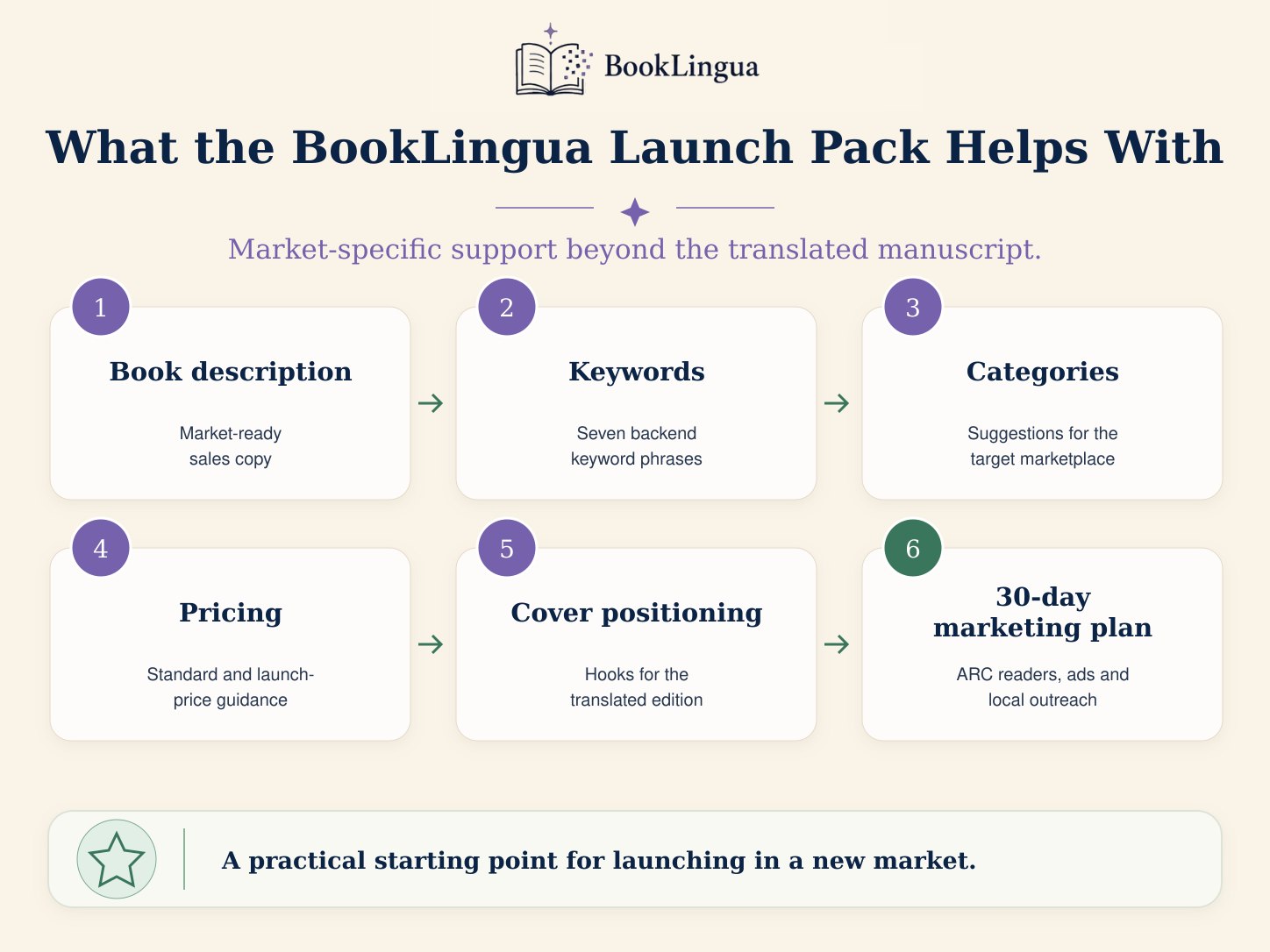
The most useful part, however, was the Launch Pack as it helped me work out how to describe the book, where to categorise it and what price would make sense for German readers.
The Launch Pack gave me:
-
A German description ready to use
-
Seven German backend keyword phrases
-
Suggested Amazon.de categories
-
A recommended standard and launch price
-
Positioning and marketing hooks that helped inform the German front cover
-
German advertising keywords and marketing hooks
-
A 30-day marketing plan covering German ARC readers, LovelyBooks, Amazon Ads and creator outreach
-
A market-specific KDP checklist
I still reviewed each recommendation and made the final decisions myself, but I was not starting from a blank page or translating an English marketing plan word for word. The cover, description, categories, pricing and promotional strategy could all be shaped around the same market-specific positioning.
Translating the book is only part of the launch
Making your book available in another language involves more than producing translated sentences. You need a readable, reviewed manuscript, a correctly formatted file and a listing that makes sense to readers in that market.
BookLingua combines the translation with a separate editorial-review stage, targeted review of selected passages by a professional translator and market-specific launch materials. The finished delivery includes the files and guidance needed to move from translation to publication, while leaving the author in control of the final checks and publishing decisions.
If you are preparing to reach readers in another language, you can calculate the cost of translating your book or read the full Bride of the Hollow King translation case study.